
Replacing the Allen-Bradley 1746 SLC 500 with CompactLogix: The Obsolescence Roadmap
The Reality of SLC 500 Obsolescence

For over three decades, the Allen-Bradley 1746 SLC 500 has been the undisputed workhorse of the industrial world. From small machine control to large-scale process plants, these controllers earned a reputation for near-indestructibility. However, the lifecycle of the SLC platform has reached a critical turning point. Now designated as “Silver Series” by the manufacturer, the SLC 500 is officially in the sunset phase of its existence. This means factory-direct support is dwindling, and the availability of brand-new, current-production modules is becoming increasingly rare. For many facilities, this transition creates a “modernize or pray” scenario where a single module failure could result in days of unplanned downtime while waiting for a viable replacement.
The risks of staying on the legacy platform extend beyond simple hardware availability. Older processors, such as the SLC 5/01, 5/02, and 5/03, lack the modern Ethernet/IP capabilities and robust cybersecurity features required in today’s connected factory. Furthermore, finding engineering talent fluent in the aging RSLogix 500 software environment is becoming a challenge as the industry shifts toward the tag-based architecture of Studio 5000.
At TCI Supply, we recognize that a full-scale migration isn’t always feasible overnight. To bridge the gap, we maintain a vast inventory of surplus 1746 models, including processors, power supplies, and I/O modules, all backed by our comprehensive warranty. This allows you to maintain your existing architecture while you plan a strategic “Obsolescence Roadmap.” Whether you need a critical spare to keep a legacy line running or you are ready to explore a complete 1746-to-5069 / 1769 conversion, understanding your options is the first step toward securing your plant’s future.
Table of Contents
- → Choosing Your Destination: 1769 vs. 5069 CompactLogix
- → SLC 500 to CompactLogix (5069) Cross-Reference Table
- → SLC 500 to CompactLogix (1769) Cross-Reference Table
- → Hardware and Software Conversion Work:
- → 1492 Conversion Hardware – Eliminating the Rewiring Nightmare
- → How the 1492 System Works
- → The Hybrid Approach
- → Frequently Asked Questions: SLC 500 to CompactLogix Migration
Choosing Your Destination: 1769 vs. 5069 CompactLogix
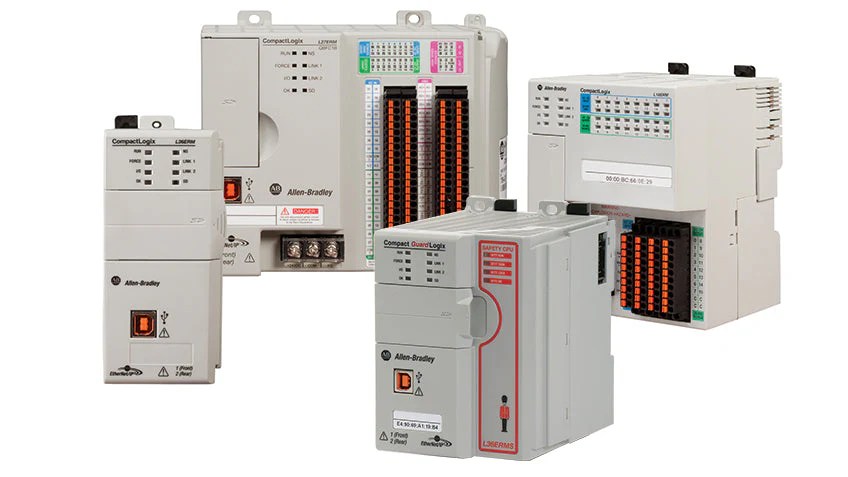
Once you have decided to move away from the 1746 SLC architecture, the most critical question is which modern platform will serve as the new “brain” of your operation. In the Allen-Bradley ecosystem, the two primary successors are the CompactLogix 5370 (1769 Series) and the CompactLogix 5380 (5069 Series). Choosing between them isn’t just about picking the newest model; it’s about matching the hardware to your specific performance needs and physical cabinet constraints.
The 1769 CompactLogix has been the industry standard for a decade. It is a stable, proven platform that many engineers prefer because it feels familiar. It uses the same 1769 I/O modules that have been around since the early MicroLogix days, making it a “safe” bet for straightforward applications. However, if you are looking to future-proof your facility, the 5069 CompactLogix is the superior choice. It offers a significantly faster internal backplane for high-speed I/O, enhanced security features to protect against cyber threats, and built-in dual Ethernet ports that support Device Level Ring (DLR) topologies natively.
Performance Comparison: Legacy vs. Modern
To put the jump in perspective, see how the legacy SLC 5/05 compares to the current CompactLogix offerings:
| Feature | Legacy SLC 5/05 (1746) | CompactLogix 5370 (1769) | CompactLogix 5380 (5060) |
|---|---|---|---|
| Software | RSLogix 500 | Studio 5000 | Studio 5000 |
| Architecture | Register-Based (Data Tables) | Tag-Based | Tag-Based (High Performance) |
| Communication | Serial / Ethernet (Slow) | Ethernet/IP (10/100) | Dual GigE (1 Gbps) |
| I/O Capacity | Limited by Chassis | Up to 31 Local Modules | Up to 31 Local Modules |
| Memory | Max 64 KB | Up to 5 MB | Up to 10 MB |
The jump from an SLC to a 5069 controller is like moving from a dial-up connection to high-speed fiber optic. While the 1769 is excellent for simple replacements, the 5069 provides the processing power needed if you plan on adding motion control, high-resolution HMI screens, or data analytics to your line in the future.
SLC 500 to CompactLogix (5069) Cross-Reference Table
| Legacy 1746 Part # (SLC) | Modern 5069 Part # (Compact 5000) | Technical Differences | Conversion Requirements |
|---|---|---|---|
| 1746-L541 (SLC 5/04) | 5069-L306ER | SLC uses DH+; 5069 is pure Ethernet/IP. | Requires software conversion (Project Migrator) and potential HMI driver updates. |
| 1746-IB16 (DC Input) | 5069-IB16 | SLC is 16-bit; 5069 is 32-bit architecture. | Use 1492-CM1746-M01 module to reuse existing terminal block. |
| 1746-IV16 (Sinking DC In) | 5069-IB16 | 5069-IB16 can be wired for Sinking or Sourcing. | Verify common wiring; 5069 modules are more flexible than 1746 series. |
| 1746-IA16 (AC Input) | 5069-IA16 | 5069 has much faster signal response (input filtering). | Use 1492-CM1746-M11 to handle the AC wiring transition. |
| 1746-OB16 (DC Output) | 5069-OB16 | 5069 has higher surge current capacity. | Requires 1492-CABLE…S to bridge the conversion interface. |
| 1746-OV16 (Sinking DC Out) | 5069-OB16 | 5069 is natively Sourcing; polarity may need swap. | Important: Verify field device polarity before connecting to 5069-OB16. |
| 1746-OW16 (Relay Out) | 5069-OW16 | 5069 relays are faster but have lower max amperage. | Verify load current; use interposing relays for high-amp inductive loads. |
| 1746-NO4I (Analog Out) | 5069-OF8 | 5069 offers 8 channels vs SLC’s 4; higher accuracy. | Use 1492-AIFM…; Re-scale data in Studio 5000. |
| 1746-NT4 (Thermocouple) | 5069-IY16 | 5069-IY16 supports 16 channels and Cold Junction Comp. | Use 1492-AIFM… with CJC terminals for accurate temp readings. |
| 1746-NR4 (RTD Input) | 5069-IY16 | 5069 supports 2, 3, and 4-wire RTDs natively. | Wire-check required: 5069 terminals are smaller than 1746 terminals. |
| 1746-P1 (Power Supply) | 5069-FPD | SLC PS ran the rack; 5069 FPD distributes field power. | Must add 1606-XLE 24VDC supply for MOD and SA power. |
| 1746-P4 (DC Power Supply) | 5069-FPD | 5069 uses 24VDC natively; no 120VAC-to-DC conversion. | Simplified wiring; no need for a massive chassis power supply. |
Additional Swap Work and Technical Notes

-
1746-P1/P2 Power Supply Disposal: When you remove the SLC power supply, you gain significant cabinet space. However, remember that the 5069-L306ER controller and 5069-FPD modules require two separate power feeds: MOD power (for the PLC logic) and SA power (for the field I/O). Do not jumper these from a noisy motor power source; use a clean, isolated 24VDC supply like the Allen-Bradley 1606 series.
-
High-Density Wiring: If you are replacing 32-point modules (1746-IB32/OB32), the wiring can become crowded. The 1492-CM1746-M04 conversion module is essential here because it manages the physical transition from the wide SLC terminal block to the narrow Compact 5000 footprint without straining your wires.
-
Safety Instruction Changes: If your SLC code used the “Immediate I/O” (IIM/IOM) instructions, these do not exist in the same way in Studio 5000. You will need to adjust your program to use the Requested Packet Interval (RPI) settings in the module configuration to ensure the data updates fast enough for your process.
SLC 500 to CompactLogix (1769) Cross-Reference Table
While the 5069 is the latest platform, many plants prefer migrating to the 1769 CompactLogix because it is a proven, mid-range “sweet spot” that has been the industry standard for over a decade. The 1769 modules are also physically wider and more robust, often feeling more familiar to technicians who have spent years on the SLC 500.
Here is the cross-reference table for migrating from 1746 SLC 500 to the 1769 CompactLogix platform.
| Legacy 1746 Part # (SLC) | Modern 1769 Part # (CompactLogix) | Technical Differences | Conversion Requirements |
|---|---|---|---|
| 1746-L541 (SLC 5/04) | 1769-L33ER | SLC uses DH+; 1769 is dual-port Ethernet/IP. | Requires Project Migrator tool; DH+ networks will need a gateway (ProSoft). |
| 1746-IB16 (DC Input) | 1769-IQ16 | 1769-IQ16 is Sinking/Sourcing (Universal). Replaces legacy IB/IV cards. | Use 1492-CM1746-M01 and matching 1492-CABLE for no-solder wiring. |
| 1746-IV16 (Sinking DC In) | 1769-IQ16 | 1769-IQ16 handles both Sinking & Sourcing. Wire common accordingly. | Direct logical replacement; verify common ground wiring in the conversion kit. |
| 1746-IB32 (32pt DC In) | 1769-IQ32 | 1769-IQ32 uses high-density 40-pin connectors (Sink/Source). | Use 1492-CM1746-M04 interface to map the SLC swing-arm to the 40-pin header. |
| 1746-IA16 (AC Input) | 1769-IA16 | 1769 has improved noise immunity for 120VAC signals. | Use 1492-CM1746-M11 to transition the high-voltage AC wires safely. |
| 1746-OB16 (DC Output) | 1769-OB16 | 1769-OB16 provides 0.5A per point (8A total). | Standard conversion kit; verify that field device surge doesn’t exceed 0.5A. |
| 1746-OB32 (32pt DC Out) | 1769-OB32 | Significant space savings; uses high-density cabling. | Requires the 32-point specific 1492 conversion module and high-density cable. |
| 1746-OV16 (Sinking DC Out) | 1769-OV16 | Maintains “Sinking” logic for compatibility with PNP-common loads. | Use standard 1769 conversion kit; ensure polarity is not swapped during migration. |
| 1746-OW16 (Relay Out) | 1769-OW16 | 1769 relays are robust but have a 2A per point limit. | Check your SLC loads; if you were pushing 5A through an SLC relay, add an interposing relay. |
| 1746-OX8 (Isolated Relay) | 1769-OW8I | 1769-OW8I provides 8 individual isolated relays. | Use 1492-IFM20 interface; ensure the conversion mounting plate is grounded. |
| 1746-NI8 (Analog In) | 1769-IF8 | 1769-IF8 is a high-resolution 16-bit differential input card. | Use 1492-AIFM8-3 for proper shielding. SLC code (0-32767) must be re-scaled. |
| 1746-NI4 (4-ch Analog In) | 1769-IF4XOF2 | This is a “Combo” card (4 In / 2 Out) often used for small upgrades. | Excellent for small SLC racks; saves space by combining inputs and outputs. |
| 1746-NO4I (Analog Out) | 1769-OF4VI | 1769-OF4VI supports both Voltage and Current (Isolated). | Requires 1492-AIFM; re-scale HMI data to match 1769 engineering units. |
| 1746-NT4 (Thermocouple) | 1769-IT6 | 1769-IT6 offers 6 channels instead of 4; better resolution. | Requires 1492-AIFM with Cold Junction Compensation (CJC) terminals. |
| 1746-NR4 (RTD Input) | 1769-IR6 | 1769-IR6 supports 6 channels; works with Pt100, Ni, and Cu RTDs. | Direct replacement; wire checking is easier due to the larger 1769 terminal blocks. |
| 1746-HSCE (High Speed) | 1769-HSC | 1769-HSC supports 2 quadrature encoders (A, B, Z). | Program logic for HSC must be entirely rewritten; the instruction set is different. |
| 1746-P2 (Power Supply) | 1769-PA4 | 1769 Power Supplies mount directly to the DIN rail. | No 1492 kit needed; the 1769-PA4 or PB4 powers the bus via the end-cap. |
Hardware and Software Conversion Work:

-
Chassis Power vs. Bus Power: Unlike the SLC 500, which used a large chassis-mounted power supply to drive the backplane, the 1769 CompactLogix uses a power supply module (like the 1769-PA4) that sits directly on the DIN rail. You must calculate the “Power Supply Distance Rating”—each module has a limit on how many slots away from the power supply it can be.
-
Expansion Cables: If your old SLC 500 had multiple racks connected via 1746-C7 cables, you will now use 1769-CRR… or 1769-CRL… expansion cables. However, with the speed of Ethernet, many engineers prefer to replace the second rack with a 1769-AENTR (Ethernet Adapter) instead of using physical bus cables.
-
The “End Cap” Requirement: Every 1769 rack must have a right-hand bus terminator (1769-ECR). Without this $50 part, the entire PLC will stay in a “Bus Fault” status.
-
Software Scaling: When migrating code from RSLogix 500 to Studio 5000 for the 1769 series, pay close attention to the Configuration Assembly. The 1769 analog cards have a different “Bit-Packing” order than the 1746 cards. Using the Rockwell Project Migrator will catch most of this, but you should manually verify your analog min/max raw values.
1492 Conversion Hardware – Eliminating the Rewiring Nightmare
The traditional way to migrate an SLC 500 rack is a “rip-and-replace.” This involves labeling every single wire, disconnecting them, pulling out the old 1746 chassis, mounting the new CompactLogix DIN rail, and landing every wire on the new modules. For a high-density 10-slot rack, this can easily take 20 to 30 hours of labor and carries a high risk of “fatigue errors” where wires are landed on the wrong terminals.
To solve this, Rockwell developed a “cheat code” for engineers: the 1492 Wiring Conversion System. This system allows you to migrate the hardware in a fraction of the time by leveraging your existing field wiring. Instead of disconnecting the wires from the 1746 “swing-arms,” you simply unplug the terminal block from the old module and plug it into a conversion interface.
This table outlines the essential components required to transition from 1746 SLC 500 hardware to modern CompactLogix 5370 (1769) or 5380 (5069) platforms.
| Part Number (Base) | Description | Target Series | Use / Method |
|---|---|---|---|
| 1492-CH1746-10 | Conversion Chassis | 5069 | The primary structural frame. It mounts where the old SLC chassis was and provides the foundation for the new system. |
| 1492-CM1746-M01 | Conversion Module | 5069 | The “docking station” that accepts the old 1746 swing-arm (terminal block) without removing field wires. |
| 1492-CABLE010S | Pre-Wired Cable | 1769 / 5069 | Factory-tested harness that bridges the conversion module (old wiring) to the new CompactLogix I/O. |
| 1492-IFM20F | Analog Interface | 1769 / 5069 | Specialized for analog I/O (like 1746-NI8). Includes terminals for shielding and twisted-pair management to prevent signal noise. |
| 1492-H4 | Fusible Terminal | 1769 / 5069 | Adds individual point protection for outputs. Ideal for protecting new 5069 cards from legacy field devices. |
| 1492-EAHJ35 | End Anchors | 5069 | Essential mechanical stops used to lock the Compact 5000 I/O modules securely onto the DIN rail to prevent sliding. |
How the 1492 System Works
-
The Mounting Plate: You remove the SLC 500 chassis and bolt in a 1492 mounting plate. It is designed to line up perfectly with the existing mounting holes in your cabinet.
-
The Interface Modules: These modules sit on the plate where the old I/O used to be. You take the existing 1746 terminal block (still attached to your field wires) and click it directly onto the 1492 interface.
-
The Conversion Cables: Pre-manufactured cables run from the interface modules to your new CompactLogix 1769 or 5069 I/O.
This method turns a complex electrical project into a mechanical assembly task. The best part? If you find a bug in your new code that you can’t fix immediately, you can physically swap the old SLC rack back in within minutes, because the original field wiring was never touched.
The Hybrid Approach – Modernizing the “Brains” While Saving the Wiring
A full-scale rip-and-replace migration is the ideal end goal, but reality—budget cycles, limited shutdown windows, and the sheer volume of field wiring—often demands a middle ground. This is where the Hybrid Approach excels. Instead of replacing every I/O module and terminal block at once, you replace only the SLC 500 processor with a specialized communication adapter: the 1747-AENTR.
The 1747-AENTR is a “hero product” for engineers facing obsolescence on a tight schedule. It slides into the leftmost slot of your existing 1746 chassis, exactly where the SLC 5/01 through 5/05 processor used to sit. This module effectively turns your entire legacy SLC rack into a “Remote I/O” station on an Ethernet/IP network.
Why Choose the Hybrid Path?
-
Zero Wiring Changes: Since you are only swapping the processor, your field wiring remains 100% untouched. You don’t need conversion kits, mounting plates, or new cables.
-
Decoupled Logic Migration: You can mount a brand-new CompactLogix 5380 (5069) in a separate enclosure and have it “talk” to the 1747-AENTR over a single Cat5e cable. This allows you to upgrade your software to Studio 5000 and modernize your HMI without touching the physical I/O.
-
Strategic Phasing: This approach allows you to spread your capital expenditure (CapEx) over several years. You upgrade the “brains” this year and replace the I/O racks one by one as your maintenance schedule permits.
-
Instant Recovery: If your new PLC code has a major bug during commissioning, you can physically slide the old SLC processor back into the rack and be back in production in minutes.
Technical Considerations for the Hybrid Approach
| Feature | Legacy 1746 Processor | Hybrid 1747-AENTR |
|---|---|---|
| Logic Execution | Local (Inside the rack) | Remote (Managed by a new CompactLogix) |
| Network | DH+, RS-232, or Ethernet | Dual-Port Ethernet/IP (Supports DLR) |
| I/O Capacity | Up to 3 local chassis | Up to 3 chassis via 1746-C7 cables |
| Software | RSLogix 500 | Studio 5000 (Add-On Profile required) |
The 5-Step SLC 500 Migration Checklist
1. Audit Your Physical Cabinet Space
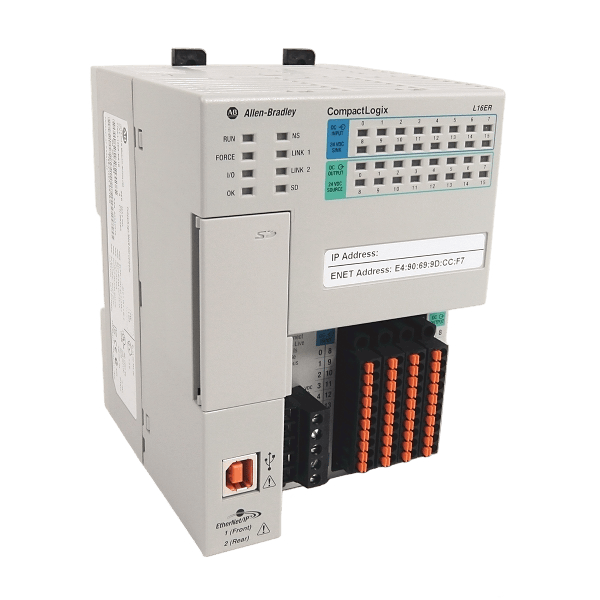
Before ordering hardware, measure your enclosure. While the 1492 Mounting Plate fits the existing holes, the combined depth of the conversion modules, the cables, and the new CompactLogix controller is deeper than the original SLC 500 rack.
-
Check: Is there at least 8–10 inches of clearance from the sub-panel to the cabinet door?
-
Check: Do you have enough DIN rail space if you are adding separate 24VDC power supplies?
2. Run the “Project Migrator” Tool Early
Don’t wait for the hardware to arrive to start the software conversion. Export your SLC 500 program as an .SLC or .成果 library file and run it through the Rockwell Automation Project Migrator.
-
Identify: Look for “Errors” or “Warnings” regarding Indirect Addressing, PID loops, or Block Transfers (BTR/BTW).
-
Action: Create a “Tag Mapping” document to track how your old $B3$ and $N7$ addresses were renamed in Studio 5000.
3. Select Your “Keying” Strategy
Recall our discussion on Electronic Keying. If you are installing modern Series C or Series B CompactLogix modules, ensure your Studio 5000 version is high enough to support them.
-
Check: Do you have the latest Add-On Profiles (AOP) installed on your programming laptop?
-
Decision: Will you use “Compatible Module” keying to allow for easier future swaps?
4. Inventory Your 1492 Conversion Components
Using the cross-reference tables above, build a complete Bill of Materials (BOM). A single missing cable can stall a 12-hour shutdown.
-
Verify: Did you select the correct Mounting Plate size (4, 7, 10, or 13-slot)?
-
Verify: Do you have a 1769-ECR (End Cap) or the correct 5069-FPD modules to power the new bus?
5. Plan for Communication Gateways
The SLC 500 often communicated via DH+ or Remote I/O (RIO). Modern CompactLogix is natively Ethernet/IP.
-
Action: Identify every HMI, Drive, or other PLC that “talks” to the SLC.
-
Solution: Order a gateway (like a ProSoft or HMS Anybus) if you cannot immediately upgrade those peripheral devices to Ethernet.
Frequently Asked Questions: SLC 500 to CompactLogix Migration
To wrap up, here are the most common questions our technical team at TCI Supply receives regarding the transition from legacy 1746 hardware to modern platforms.
How do I migrate my existing RSLogix 500 code to the new PLC?
Transitioning to Studio 5000 requires the Project Migrator tool to convert legacy .SLC files. While it automates the bulk of your ladder logic, it is not a “one-click” fix. You must manually address instructions that don’t translate directly, such as Indirect Addressing and PID loops. This is also your opportunity to replace cryptic addresses like B3:0 with descriptive, modern Tag-Based names.
Can I keep my existing 1746 I/O and only upgrade the processor?
Yes. By using the 1747-AENTR adapter, you can replace your SLC 5/01-5/05 processor and turn the entire rack into “Remote I/O” on an Ethernet/IP network. This allows a new CompactLogix controller to manage your old hardware while you avoid the labor cost of a full rewiring project.
What is the biggest physical hurdle when using 1492 conversion kits?
Depth clearance. While the 1492 mounting plates use the same bolt holes as your old chassis, the “sandwich” of the conversion module, the cables, and the new PLC adds roughly 2 to 3 inches of depth. Always measure the distance to your cabinet door before committing to a full conversion.
Will my old DH+ (Data Highway Plus) network still work?
Not natively. Modern CompactLogix controllers (1769 or 5069) are Ethernet/IP only. If you have other PLCs or HMIs on a DH+ network, you will need a communication gateway, such as a ProSoft AN-X2, to bridge the two different network protocols.
Why does the 5069 system require more power supplies than my old SLC?
The SLC 500 was powered by one large chassis supply. Modern 5069 hardware separates System Power (MOD), which runs the CPU logic, from Field Power (SA), which drives your I/O devices. This prevents electrical noise from your field devices from “glitching” the processor. You will typically need a dedicated 24VDC power supply (like the Allen-Bradley 1606 series) to provide these separate feeds.