
AB PowerFlex 525 Fault Codes: The Complete List with Causes and Fixes
1. Your Drive Is Faulted. Here’s the Code List.

When an Allen-Bradley PowerFlex 525 faults, the drive stops the motor, the fault indicator lights, and the display shows a code with an F prefix. This page is the complete list of PowerFlex 525 fault codes, what each one means, the most likely causes, and how to fix them.
The codes below apply to the PowerFlex 525 (Bulletin 25B) and to PowerFlex 523 and 527. If you’re troubleshooting from the drive’s built-in display, you’ll see the code number. If you’re on the HIM or in Connected Components Workbench, you’ll also see the fault name. The table lists both.
Table of Contents
- → 2. How to Clear a Fault, and When You Shouldn’t
- → 3. The Complete AB PowerFlex 525 Fault Code Table
- → 4. The Most Common Faults
- → 5. When the Code Means Hardware
- → 6. Video Guide: PowerFlex 525 Troubleshooting
- → 7. Get the Drive Back Up: Source Your Replacement From TCI Supply
- → Frequently Asked Questions
2. How to Clear a Fault, and When You Shouldn’t
The Allen-Bradley PowerFlex 525 gives you three ways to clear a fault. Press the Stop key, if parameter P045 is configured to allow fault clearing from the keypad. Cycle power to the drive, waiting for the display to go fully dark before reapplying. Or set fault-clear parameter A551 to 1, which is also the path your PLC uses to clear faults over EtherNet/IP.
Clearing the code does not clear the condition. An F007 Motor Overload will clear instantly and trip again when the overload returns. An F013 Ground Fault that clears and returns is telling you the insulation problem is still in the conduit. The fault history helps: parameters b007 through b009 store the last three fault codes, so even after a power cycle you can see what tripped in order, which matters when one fault is causing another.
3. The Complete AB PowerFlex 525 Fault Code Table
| Code | Fault name | What it means and likely cause | Fix |
|---|---|---|---|
| F000 | No Fault | No fault present. | No action needed. |
| F002 | Auxiliary Input | The external trip (auxiliary) input opened. On most drives this is the STO circuit or an external interlock wired to the drive. | Check remote wiring at the safety and digital input terminals. Verify communications programming for an intentional fault. See the F002 deep dive below. |
| F003 | Power Loss | Single-phase operation detected with excessive load. The drive lost an input phase or the line sagged under load. | Monitor the incoming AC line for low voltage or interruptions. Check input fuses. Reduce load. |
| F004 | UnderVoltage | DC bus voltage fell below minimum. | Monitor the incoming AC line for low voltage or line power interruption. |
| F005 | OverVoltage | DC bus voltage exceeded maximum. High line or transients, or motor regeneration during decel. | Monitor the AC line for high voltage or transients. Extend decel time or install a dynamic brake resistor. |
| F006 | Motor Stalled | Output current exceeded the current limit too long; the motor could not accelerate. | Increase accel time (P041, A442, A444, A446) or reduce load. Check for an overhauling load. |
| F007 | Motor Overload | Excessive motor load; output current exceeded P033 Motor OL Current for too long. | Reduce load. Verify A530 Boost Select setting. See the F007 deep dive below. |
| F008 | Heatsink OvrTmp | Power module heatsink over temperature. | Check for blocked or dirty heatsink fins, verify ambient below rating. |
| F009 | CC OvrTmp | Control module over temperature. | Check ambient, airflow obstruction, dirt or debris, and the fan. |
| F012 | HW OverCurrent | Instantaneous hardware overcurrent trip (typically 200%+ of rating). | Check programming, excess load, A530 Boost Select, DC brake volts set too high, and other causes of excess current. |
| F013 | Ground Fault | A current path to ground was detected on the drive output. | Check the motor and all wiring between drive output terminals and motor for a grounded condition. See the F013 deep dive below. |
| F015 | Load Loss (525 only) | Output torque current fell below A490 Load Loss Level for longer than A491 Load Loss Time. Often a broken belt or coupling. | Verify connections between motor and load. Verify level and time settings. |
| F021 | Output Ph Loss | Output phase loss detected (if enabled via A557). | Verify motor wiring and the motor itself. |
| F029 | Analog In Loss | An analog input configured to fault on signal loss lost its signal. | Check for broken or loose connections at the inputs. Verify t094 or t097 configuration. |
| F033 | Auto Rstrt Tries | The drive attempted the programmed number of auto restarts (A541) and the fault persisted. | Correct the cause of the underlying fault, then clear manually. See the F033 deep dive below. |
| F038 | Phase U to Gnd | Ground fault detected on output phase U. | Check drive-to-motor wiring and motor for a grounded phase. Replace drive if the fault cannot be cleared. |
| F039 | Phase V to Gnd | Same as F038, phase V. | Same as F038. |
| F040 | Phase W to Gnd | Same as F038, phase W. | Same as F038. |
| F041 | Phase UV Short | Short circuit detected between output phases U and V. | Check motor and output terminal wiring for a shorted condition. Replace drive if fault cannot be cleared. |
| F042 | Phase UW Short | Same as F041, phases U and W. | Same as F041. |
| F043 | Phase VW Short | Same as F041, phases V and W. | Same as F041. |
| F048 | Params Defaulted | Drive parameters were reset to defaults. | Clear the fault or cycle power, then reprogram parameters as needed. |
| F059 | Safety Open (525 only) | One or both safety inputs (S1, S2) are not enabled. The STO circuit is open. | Check safety input signals. If not using the safety function, verify and tighten the jumper across terminals S1, S2, and S+. See the F059 deep dive below. |
| F063 | SW OverCurrent | Software overcurrent based on programmed level and time. | Verify connections between motor and load. Verify level and time settings. |
| F064 | Drive Overload | Drive rating exceeded by excessive load over time. | Reduce load or extend accel time. |
| F070 | Power Unit | Fault detected in the drive’s power section. | Check that ambient temperature has not been exceeded. Cycle power. Replace the drive or power module. |
| F071 | DSI Net Loss | Control over the RS-485 (DSI) network was lost. | Cycle power, check comm cabling, check Modbus/DSI settings and status. |
| F072 | Opt Net Loss | Network connection through an option card was lost. | Cycle power, check cabling, check the network adapter setting and external network status. |
| F073 | EN Net Loss (525 only) | EtherNet/IP network connection lost. | Cycle power, check cabling, check EtherNet/IP settings and external network status. |
| F080 | Autotune Failure | The autotune procedure did not complete. | Restart the procedure. Verify motor data parameters and that the motor is not coupled to a load that prevents rotation if using rotate tune. |
| F081 | DSI Comm Loss | Communication on the DSI/Modbus port was lost. | Cycle power, check cabling, check settings and status, adjust C125 Comm Loss Action if appropriate, ground C1/C2 for noise immunity, replace wiring, master device, or control module. See the F081 deep dive below. |
| F082 | Opt Comm Loss | Communication with an installed option card was lost. | Cycle power, reseat the option card, adjust C125, replace wiring, card, or control module. |
| F083 | EN Comm Loss (525 only) | EtherNet/IP communication was lost. | Cycle power, check EtherNet/IP and drive Ethernet settings, adjust C125, replace wiring, switch, or control module. |
| F091 | Encoder Loss (525 only) | Encoder channel signal missing. | Check wiring. In positioning mode with Quad Check, swap encoder channel inputs or two motor leads. Replace the encoder if faulty. |
| F094 | Function Loss | The function-loss input opened. | Close the input to the terminal and cycle power. |
| F100 | Parameter Chksum | Parameter memory checksum error. | Set P053 Reset To Defaults to 2 Factory Rset, then reprogram. |
| F101 | External Storage | External memory error. | Set P053 to 2 Factory Rset. |
| F105 | C Connect Err | Control module connection error to the power module. | Clear the fault and verify parameters. Never remove or install the control module with power applied. |
| F106 | Incompat C-P | Control module and power module are incompatible. | Change to a compatible power module or the matching control module family. |
| F107 | Replaced C-P | The power module behind this control module has been replaced with a different rating. | Change to the original rating power module, or replace the control module if changing the power module does not resolve. |
| F109 | Mismatch C-P | Control/power module rating mismatch. | Set P053 Reset To Defaults to 3 Power Reset. |
| F110 | Keypad Membrane | Keypad membrane failure detected. | Cycle power. Replace the control module if the fault cannot be cleared. |
| F111 | Safety Hardware (525 only) | Fault in the safety input hardware. | Check safety input signals and the S1/S2/S+ jumper if safety is unused. Replace the control module if the fault cannot be cleared. |
| F114 | uC Failure | Microcontroller failure. | Cycle power. Replace the control module if the fault cannot be cleared. |
| F122 | I/O Board Fail | I/O board failure. | Cycle power. Replace the drive or control module if the fault cannot be cleared. |
| F125 | Flash Update Req | Firmware is invalid or incomplete; a flash update is required. | Perform a firmware flash update to load a valid firmware set. |
| F126 | NonRecoverablErr | Non-recoverable internal error. | Clear the fault or cycle power. Replace the drive or control module if it cannot be cleared. |
| F127 | DSIFlashUpdatReq | Firmware flash update required via DSI. | Perform a firmware flash update over DSI communications. |
Don’t see your fault code? Contact TCI Supply or call 1-800-755-2883 and we’ll help you diagnose it, and if the answer turns out to be hardware, we stock the replacement.
4. The Most Common Faults
F002 Auxiliary Input
The AB drive is reporting that an external trip circuit opened, and on the 525 the usual suspect is the Safe Torque Off wiring at terminals S1, S2, and S+. New drives ship with a jumper installed across those terminals; drives installed to replace a PowerFlex 40 often fault here because the old 22B had no STO circuit and the installer never landed anything on S1/S2. Work it in this order: check whether the S1/S2/S+ jumper is present and tight if you’re not using the safety function. If a safety relay or e-stop chain is wired there, trace it for an open contact. Then check any digital input programmed as an auxiliary trip. If the fault appeared right after commissioning a new drive, it’s the jumper. Our PowerFlex 525 guide covers the 22B migration in detail.
F059 Safety Open
The drive says plainly that one or both safety inputs are open. If the machine has a real safety circuit, something in it is open. If it doesn’t, the jumper across S1, S2, and S+ is missing or loose. One field reality worth knowing: vibration works screws loose over time, so a drive that now shows F059 usually needs nothing more than the terminals re-torqued.
F004 UnderVoltage and F005 OverVoltage
Both are DC bus faults. F004 means the bus sagged. F005 means the bus climbed, and the cause is either the line or the motor. A load that overhauls the motor during decel pumps energy back into the bus. If F005 hits during stops, lengthen the decel time in P042 or add a dynamic brake resistor. If it hits at random, put a meter on the incoming line.
F007 Motor Overload
The drive’s electronic overload says the motor ran above its programmed full-load amps too long. First verify P033 Motor OL Current actually matches the motor nameplate FLA, because a drive programmed for the wrong motor trips early or never. If P033 is right, the motor worked too hard: check for binding loads, dirty fans, low line voltage, or a process change. F007 that appears after years of clean running is a mechanical message, not electrical.
F013 Ground Fault
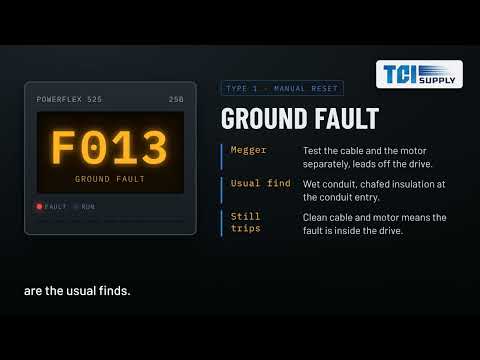
Current is leaking from a drive output phase to ground. Disconnect the motor leads at the drive and megger the cable and motor separately; wet conduit, chafed insulation at the conduit entry, and failing motor windings are the usual finds. If the wiring and motor test clean and F013 persists with the motor disconnected, the fault is inside the drive. Long motor lead runs can also produce nuisance ground-fault trips from capacitive charging current, which is a wiring-design issue, not a defect.
F033 Auto Rstrt Tries
The Rockwell Automation drive is telling you it already tried A541’s programmed number of restarts and the real fault kept coming back. Read b007 and diagnose that code instead. F033 on the display means a problem has now tripped the drive several times in a row, which is when to stop resetting and start investigating.
F081 DSI Comm Loss
The drive lost its RS-485 conversation. Check the cables first, then the master device, then noise: unshielded comm runs near motor leads are the classic cause of intermittent F081. Grounding the C1 and C2 shield terminals helps. If the loss is expected, C125 Comm Loss Action can be set to coast or continue rather than fault, a legitimate choice on non-critical loads.
5. When the Code Means Hardware
A handful of faults point inward, and knowing which saves hours of chasing ghosts. Every part below is something we stock or source.
| Part number | What it is | When you need it |
|---|---|---|
| 25B-D6P0N104 | PowerFlex 525, 3 HP, 480V, Frame A | Complete drive replacement, small motors |
| 25B-D010N104 | PowerFlex 525, 5 HP, 480V, Frame B | Complete drive replacement |
| 25B-D013N104 | PowerFlex 525, 7.5 HP, 480V, Frame C | Complete drive replacement |
| 25B-D017N104 | PowerFlex 525, 10 HP, 480V, Frame C | Complete drive replacement |
| 25B-D024N104 | PowerFlex 525, 15 HP, 480V, Frame D | Complete drive replacement |
| 25B-D030N104 | PowerFlex 525, 20 HP, 480V, Frame D | Complete drive replacement |
| 25B-CTM1 | Replacement control module | F100, F110, F111, F114 faults; keeps the power module |
| 25-COMM-E2P | Dual-port EtherNet/IP adapter card | F072/F082 card replacement, DLR ring networks |
| 25-COMM-D | DeviceNet adapter card | F072/F082 on DeviceNet installations |
Need a different HP rating, a 240V or single-phase input model, or the matching power module for a two-piece repair? The full 525 lineup is covered in our PowerFlex 525 selection guide, or send us the catalog number from your drive’s label and we’ll quote the exact replacement.
6. Video Guide: PowerFlex 525 Troubleshooting
For a visual walkthrough of diagnosing, clearing faults, and inspecting hardware on the Allen-Bradley PowerFlex 525, watch the step-by-step video guide below:
7. Get the Drive Back Up: Source Your Replacement From TCI Supply
If the diagnosis landed on hardware, whether that’s a complete drive, a control module, a power module, or a comm card, send us the catalog number from your drive and we’ll confirm the exact replacement. We stock common PowerFlex 525 sizes and discontinued 520-series parts. Contact TCI Supply or call us at 1-800-755-2883.
Frequently Asked Questions
How do I see what faults happened before the one on the display?
Are PowerFlex 523 fault codes the same as the 525?
Can repeatedly resetting a fault damage the drive?
Why does my drive show F048 after a firmware update?
The display is dark and shows no code at all. Is that a fault?
TCI Supply is not an authorized Allen-Bradley distributor.